

Posted by Olga Sapach
SaaS Demo Video vs Explainer Video: Which One Do You Need?
Your SaaS product needs a video. The next question is less obvious: should you make a product demo or an explainer?
Both formats can show the same software. Both can use the same interface. Both can appear on your website, in sales conversations, or in paid campaigns. But they solve different problems.
An explainer video helps viewers understand why your product matters. A demo video helps them understand how your product actually works.
If the viewer is still asking, “Why would I need this?”, showing them every tab in your dashboard is too early.
If they already understand the problem and are asking, “Can this actually do what I need?”, another 90 seconds of abstract benefits may not be enough.
The best format therefore depends less on your product and more on what the viewer needs to understand next.
Two tracks of the same buyer journey
The two formats are not rivals. They sit at different points on the path a buyer takes, and they meet again wherever a viewer needs context and proof at once.
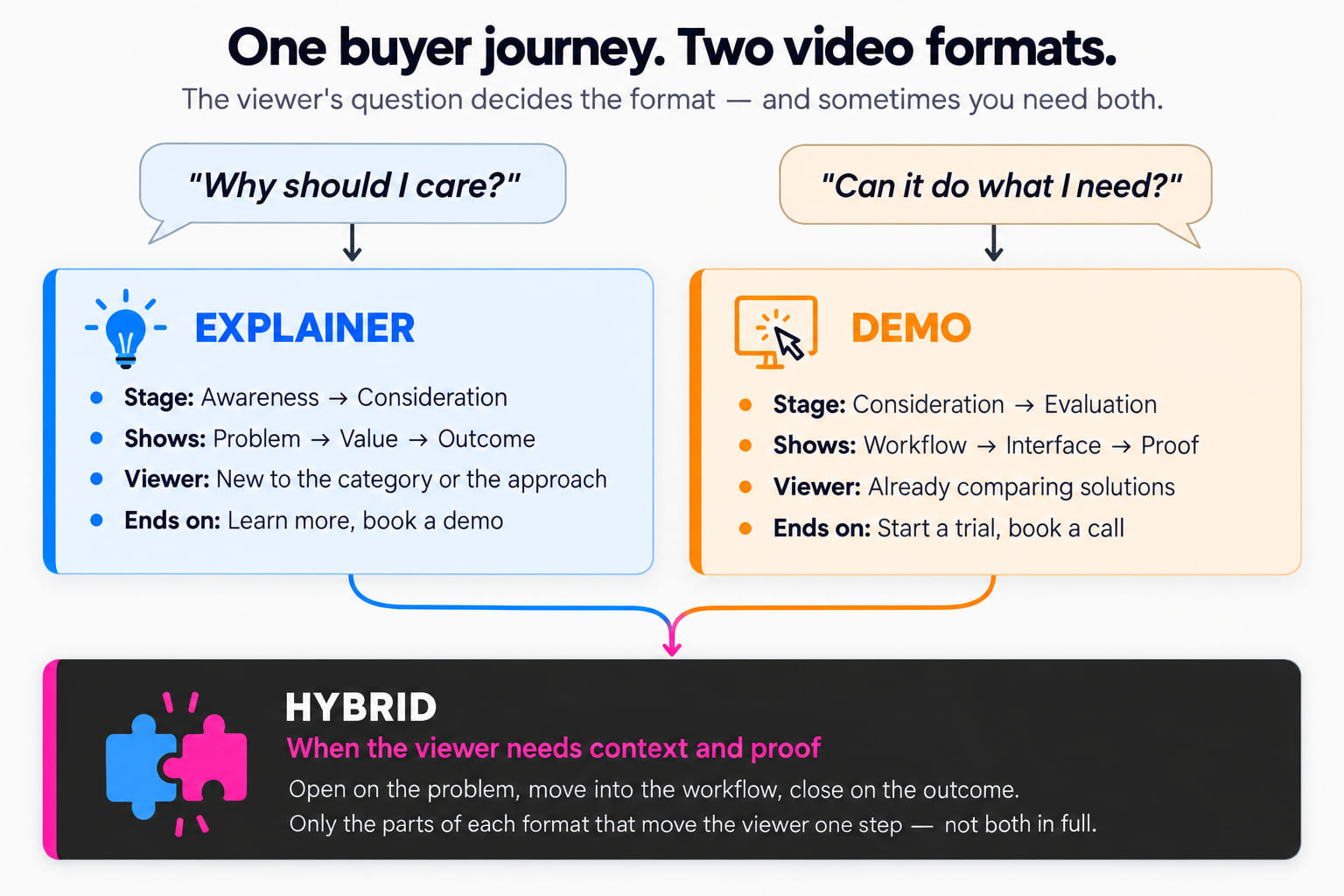
The distinction becomes much easier if you forget the names for a moment. Ask one question instead:
What does the viewer need to believe after watching this video?
If the answer is “I understand why this product is useful,” you probably need an explainer. If the answer is “I can see exactly how this product would work for my use case,” you probably need a demo.
SaaS demo video vs explainer video at a glance
| SaaS explainer video | SaaS demo video | |
|---|---|---|
| Main question | Why should I care? | How does it work? |
| Primary goal | Explain value and positioning | Demonstrate the product |
| Typical audience | Less familiar with the product | Already evaluating it |
| Focus | Problem, value, outcome | Workflow, interface, features |
| Visual approach | Animation, UI, metaphors, motion graphics | Real or recreated product UI |
| Detail level | Selective | More specific |
| Typical funnel stage | Awareness / consideration | Consideration / evaluation |
| Best CTA | Learn more, try it, book a demo | Start a trial, book a call, buy |
| Risk | Becoming too abstract | Showing too much too soon |
What is a SaaS explainer video?
A SaaS explainer video is a short video built around the product’s value proposition. It explains what problem the product addresses, who experiences that problem, what the software changes, how the solution works at a high level, and why the outcome matters.
The product interface may appear, but it is not necessarily the main character.
For example, imagine a cybersecurity SaaS platform. An explainer might begin with a familiar problem: a security team receives thousands of alerts every day. Then it introduces the product: the platform automatically prioritizes suspicious activity and gives analysts one place to investigate it. Only after that might the video show selected parts of the interface.
The viewer does not need to understand every control. They need to understand the transformation: too many alerts → prioritized risks → faster investigation. That is the job of the explainer.
At Alconost Video, SaaS explainer video production typically means short, scripted videos built around what a product does and why it matters, often using 2D or 3D animation, motion graphics, or real SaaS interface elements.
What is a SaaS demo video?
A SaaS demo video moves closer to the product. Instead of primarily describing the value proposition, it shows a workflow. For example:
- Create a new project.
- Import the data.
- Configure a rule.
- Run the analysis.
- Review the result.
The viewer sees the software behaving like software. A demo might use actual screen recordings, reconstructed interface animation, cursor movements, zooms and highlights, callouts, voiceover, or motion graphics layered over the UI.
The purpose is not to document the entire application — that would be a tutorial or training video. A good demo selects a specific workflow and uses it to prove that the product can deliver the value the viewer is interested in.
This distinction matters. Explainer: “Our platform helps support teams resolve customer issues faster.” Demo: “Here is how an agent opens a ticket, gets an AI-generated response suggestion, edits it, and resolves the conversation.” Same product, different question.
Demo, explainer, and tutorial are not the same thing
SaaS teams often blur these three formats together. That creates videos that try to do everything: introduce the company, describe the problem, explain the product, demonstrate eight features, teach the interface, and finish with a sales CTA. The result is usually too detailed for a new prospect and too shallow for an existing user.
| Format | The question it answers | What the viewer already wants |
|---|---|---|
| Explainer | Why does this product matter? | To understand the category |
| Demo | What does using this product look like? | To be persuaded |
| Tutorial | How do I complete this specific task correctly? | To use the product already |
A tutorial assumes the viewer wants to use the product. A demo still has to persuade. That is why a demo should not feel like someone recorded a support article.
Alconost Video’s software training videos, for example, focus on step-by-step instructions, specific functions, and typical usage scenarios — a different job from a short marketing explainer.
Choose based on buyer awareness, not video style
One of the easiest mistakes is choosing a format based on aesthetics. “We want something animated.” “We want to show our UI.” Neither statement tells you whether you need an explainer or a demo.
An explainer can contain real UI. A demo can contain extensive animation. The real distinction is what the audience already knows.
Low awareness: explain the problem and value
Imagine someone arrives on your homepage after clicking a LinkedIn ad. They know they have a problem. They may not yet understand your product category, your terminology, or how your approach differs from the existing alternatives.
Dropping them directly into a dashboard with 14 menu items asks them to do too much cognitive work. An explainer can create the missing context first: problem → solution → outcome → selected product proof.
Higher awareness: show the product
Now imagine someone arrives after searching for customer support automation software. They have already looked at three competitors, and their questions are different. Can it integrate with our help desk? What does the agent experience look like? Can I configure the automation myself? What happens when AI cannot answer?
At this point, a demo can provide something an explainer cannot: evidence. The viewer can see the workflow rather than taking the marketing claim on trust.
Which should you put on your SaaS homepage?
There is no rule that every SaaS homepage needs one format. Look at what the page itself has to accomplish.
If you operate in a relatively unfamiliar category, the homepage video probably needs to behave more like an explainer. Suppose your visitor has never heard of synthetic monitoring, feature flagging, revenue intelligence, infrastructure-as-code security, or vector databases. Showing the interface immediately may explain very little — the visitor first needs a mental model.
But if you compete in an established category, visitors may already understand the basic proposition. A project-management platform does not necessarily need a 90-second explanation of why teams should manage projects. A focused demo showing what makes its workflow different may be more useful.
If category understanding is the bottleneck, explain. If product differentiation is the bottleneck, demonstrate.
What should an explainer video actually show?
A SaaS explainer usually works best when it is selective. You do not need to represent every feature. Instead, choose the shortest path between the viewer’s problem and your product’s value. A useful structure is:
1. The situation
Show a problem the audience recognizes — not a generic one like “modern businesses face many challenges,” but something concrete: “Your sales team has customer data in the CRM, calls in one platform, and product usage in another.”
2. The consequence
Explain why the situation matters. “Reps spend hours reconstructing what each account is doing before deciding who to contact.”
3. The product
Introduce the SaaS as the mechanism that changes the situation.
4. The workflow
Show just enough of the product to make the promise believable.
5. The outcome
Return to the user’s world. The value is not “an AI dashboard.” The value might be: “Sales reps know which accounts need attention before they open the CRM.”
6. The CTA
Give the viewer one logical next step.
An explainer is storytelling with product evidence. It is not an animated feature inventory.
What should a SaaS demo video show?
A demo needs a tighter use case. Do not begin by asking which features to include. Ask:
Which job should the viewer watch someone complete?
Instead of “show analytics, integrations, AI, reporting, automations, user management, and alerts,” choose “show how a RevOps manager identifies accounts at risk and creates an automated follow-up.” Now the features have a reason to appear.
A strong demo sequence often looks like this: starting situation → user action → product response → next action → useful result. That creates narrative even though most of the visual material is interface.
Do you have to show the real interface?
Not necessarily. There are three common approaches.
Actual screen recording
The easiest to produce. It is useful when the UI already looks good, the workflow is stable, accuracy matters, and the product is not changing constantly.
But raw recordings often feel slow. Real users pause. Mouse movements are messy. Dropdowns take time to open. Notifications appear. The video inherits all of those imperfections.
Recreated or animated UI
The interface is reconstructed specifically for the video. That gives the video team much more control: buttons can respond instantly, a long workflow can be compressed, unimportant UI can disappear, important states can be enlarged, and cursor movement can be precise. The trade-off is more production work.
Hybrid
Often the most practical choice. Use real product screens where authenticity matters, then apply animation, zooms, highlights, transitions, or simplified reconstructed elements when clarity improves. The viewer still recognizes the real product, but the video is not limited by the exact speed and behavior of a live screen recording.
Explainer videos can show UI too
This is where the distinction becomes less obvious. A SaaS explainer can spend much of its runtime showing the product. It is still an explainer if those screens serve a broader narrative about value.
For example. Problem: localization managers coordinate projects across spreadsheets, email, and several vendors. Product: a translation-management platform centralizes the workflow. Then the video might show creating a project, assigning languages, monitoring progress, and approving translations.
Visually, that may look similar to a demo. But the purpose is still to make the viewer understand why this product is a better way to work. The interface is evidence supporting the story.
Demo videos still need a story
The opposite mistake is assuming demos do not need narrative. A demo that simply clicks through the interface is technically accurate but often hard to remember.
The viewer does not care that your application has a dashboard, reports, automations, analytics, and settings. They care about what they can accomplish. Instead of organizing the demo around the navigation menu, organize it around an outcome.
| Structure | |
|---|---|
| Weak | Dashboard → contacts → automation → reports |
| Stronger | Find customers likely to churn → identify the cause → trigger an intervention → monitor the result |
The second structure may use exactly the same product screens. But now every screen has a reason to exist.
Where each video belongs in the SaaS funnel
Thinking in terms of funnel stage is useful, but do not treat it as a rigid rule.
Explainer video. Strong placements include the homepage, campaign landing pages, paid social, conference screens, outbound sequences, pitch decks, top-of-funnel advertising, and product-launch communication. The viewer is usually learning the proposition.
Demo video. Strong placements include product pages, feature pages, comparison pages, sales follow-ups, remarketing, trial signup pages, documentation adjacent to purchase decisions, and emails to qualified prospects. The viewer is usually evaluating the product.
But the boundaries overlap. A 30-second UI demo can work extremely well in an awareness campaign. An animated explainer can support enterprise sales. The decision should always come back to the viewer’s question.
When should you make the explainer first?
Make an explainer first when people frequently misunderstand what you sell. Signals include:
- prospects ask, “So what exactly does your company do?”;
- your sales team spends the first ten minutes of every demo explaining the category;
- your homepage needs several paragraphs before the product makes sense;
- your product solves a familiar problem in an unfamiliar way;
- your differentiator is conceptual rather than feature-specific;
- your SaaS operates behind the scenes, so the visible interface does not show the full value.
In these situations, a demo risks proving how the software works before the viewer understands why they should care.
When should you make the demo first?
Start with a demo when buyers already understand the category. Signals include:
- prospects immediately ask how specific workflows work;
- your product replaces a familiar tool;
- your interface itself is a major competitive advantage;
- buyers compare you against several similar products;
- sales repeatedly demonstrates the same two or three workflows;
- your strongest differentiation becomes obvious when someone sees the software in action.
In these situations, another abstract explainer may add less value than showing the product.
What if you need both?
Many SaaS companies do. The two formats are complementary: an explainer can create interest, and a demo can convert that interest into confidence.
Instead of forcing everything into one four-minute video, you might create a homepage explainer of 60–90 seconds introducing the product and core value; then a use-case demo showing the workflow for a specific audience; then a tutorial library of task-specific videos for customers and trial users.
That creates a video journey matching the buyer journey. And the production does not necessarily need to start from zero each time. Scripts, interface animation, product captures, visual systems, voice talent, music, and brand assets can often be reused across a series.
Can you combine a demo and an explainer in one video?
Yes. For many SaaS products, a hybrid is the strongest option. A hybrid might begin like an explainer — here is the problem — then transition into the product, then show a short UI sequence, and finish with the outcome.
This approach works particularly well when a product needs some context but also benefits from visual proof.
The danger is trying to fit too much into it. A hybrid does not mean putting every element from the explainer and every element from the demo into one video. It means using only the parts of each format necessary to move the viewer to the next step.
A simple decision framework
If you are still unsure, answer these five questions.
- Does the audience already understand the problem? No → lean toward an explainer.
- Does the audience understand your product category? No → explainer.
- Is your differentiation easiest to understand by seeing the UI? Yes → demo.
- Are prospects already actively comparing solutions? Yes → demo.
- Do they need both context and proof? Yes → hybrid.
There is no prize for choosing a pure format. The goal is to give the viewer the information they need with as little friction as possible.
Four common mistakes
Making the demo too long
SaaS teams know their product too well, which creates a natural temptation: “We should also show this feature.” Then another. And another. Soon a focused demo becomes a product tour.
A marketing demo does not need to prove that every feature exists. It needs to prove one meaningful use case. If the video has six separate goals, consider creating six shorter videos.
This also gives sales and marketing teams more flexibility. A prospect interested in analytics can receive the analytics demo. A security buyer can receive the security workflow. A new customer can receive the onboarding tutorial. One video no longer has to serve everyone.
Making the explainer too abstract
The opposite problem. There is a problem, then colorful shapes move around, then someone says “unlock seamless collaboration,” then another abstract animation appears. The product never becomes tangible.
For SaaS, you usually have something extremely useful to show: the software itself. Even in a conceptual explainer, selected interface moments provide credibility. You do not have to choose between storytelling and UI.
Showing features instead of outcomes
This affects both formats. Features matter because of what they enable. “Automated alerts” is a feature; “know about a failed payment before the customer contacts support” is an outcome. “Custom dashboards” is a feature; “give every regional manager the metrics they need without building reports manually” is an outcome.
Good SaaS video production continually connects the two: action → feature → result.
Recording a demo before the product is visually ready
A new SaaS product may work perfectly while still having inconsistent UI, placeholder copy, test data, unfinished states, engineering labels, and empty screens. A literal screen recording exposes all of it.
That does not mean you have to wait until the product is perfect. Reconstructed UI animation can show the real workflow while cleaning up distracting details. It can also make the video less fragile when the live UI changes shortly after launch.
What about product updates?
This is another important difference between the two formats. An explainer built around the product’s core problem and value proposition may remain relevant for years. A detailed demo showing exact interface interactions can become outdated after one redesign.
That should influence production. For products that release UI changes every few weeks, avoid showing unnecessary navigation, focus on stable workflows, animate UI modularly, keep source files organized, and separate interface scenes from narration where possible. The easier individual scenes are to replace, the cheaper future updates become.
Which format is better for a complex SaaS product?
Complex products often benefit from using both formats at different levels. Trying to explain an entire enterprise platform in one video usually creates one of two failures: either the video becomes so broad that viewers learn almost nothing, or so detailed that they cannot see the bigger picture.
Instead, use an explainer to communicate the system-level value, then a separate demo for workflow A, another for workflow B, and another for workflow C. Now each video has one job.
This is particularly useful for products with several buyer personas. A CTO and an operations manager may buy the same SaaS platform for completely different reasons. They do not necessarily need the same demo.
Frequently asked questions
What is the difference between a SaaS demo video and an explainer video?
A SaaS explainer focuses primarily on what the product does, why it matters, and what problem it solves. A demo focuses more closely on how the software works by showing an actual workflow or product interaction.
Which is better for a SaaS homepage?
Use an explainer when visitors first need to understand your product or category. Use a demo when visitors already understand the category and seeing the interface is the fastest way to communicate your differentiation. A hybrid can work when you need both context and product proof.
How long should a SaaS explainer video be?
A concise explainer commonly works well around the 60–90 second range, although more technical products may need longer when the additional detail genuinely helps the viewer.
How long should a SaaS demo video be?
There is no universal duration. Keep it as long as necessary to demonstrate one meaningful workflow without turning the video into a complete product tour. If several workflows are important, separate focused demos are often easier to use than one long video.
Should a SaaS demo use screen recording or animation?
Both can work. Screen recording is efficient and authentic when the interface is stable and visually ready. Recreated UI animation offers more control over pacing, focus, and visual polish. Many SaaS demos combine both approaches.
Can an explainer video show the actual product interface?
Yes. An explainer can contain substantial UI footage or UI animation. What makes it an explainer is the job the video performs: communicating the product’s value and helping viewers understand why it matters.
Can a product demo be animated?
Yes. A demo does not have to be a literal screen recording. The UI can be recreated or animated to make workflows faster, clearer, and easier to follow.
Do SaaS companies need both an explainer and a demo?
Often, yes. They serve different stages of the buyer journey. An explainer can introduce the value proposition, while demos provide more detailed evidence for prospects evaluating the product.
Explain first. Demonstrate when it matters.
The difference between a SaaS explainer and a demo is not animation versus screen recording. It is not 60 seconds versus three minutes. And it is not top-of-funnel versus bottom-of-funnel in every possible case.
The difference is the job the viewer needs the video to perform. If they need to understand why your product matters, explain. If they need to see how it solves their problem, demonstrate. If they need both, combine the formats carefully rather than forcing them into separate boxes.
At Alconost Video, we produce both animated explainers and UI-based SaaS product walkthroughs, from script and storyboard through animation, voiceover, sound, and localized versions.
If you are not sure which format your SaaS product needs, start with the audience and the question they need answered — then build the video around that.
Related articles

How to Create an Engaging and Easy-to-Watch Explainer Video
Video Production
10 minutes read
How Much Does an Animated Explainer Video Cost? Explore the figures!
Video Production
4 minutes read
Popular articles
Voiceovers in 14 languages for the Kerish Doctor software
Success stories
Voice Over
5 minutes read
Character voiceovers in Spanish and Brazilian Portuguese for the RPG Life is Feudal: Your Own
Success stories
Voice Over
5 minutes read
How Much Does an Animated Explainer Video Cost? Explore the figures!
Video Production
4 minutes read
Latest articles
How to Localize Playable Ads for Multiple Markets
Playable Ads
16 minutes read
How Much Does a Playable Ad Cost to Produce?
Playable Ads
13 minutes read
Playable Ad File Size Limits by Network: 2026 Guide
Playable Ads
15 minutes read
Have a project in mind?
We’d like to learn more about it. In return, we’ll get back to you with a solution and a quote.
Looking for a new job? Apply here!