

Posted by Olga Sapach
How Long Should a SaaS Explainer Video Be?
For most SaaS products, 60 to 90 seconds is a good starting point for an explainer video.
That is usually enough time to establish the problem, introduce the product, show why it matters, and give the viewer one clear next step — without turning the video into a feature tour.
But 60–90 seconds is not a rule.
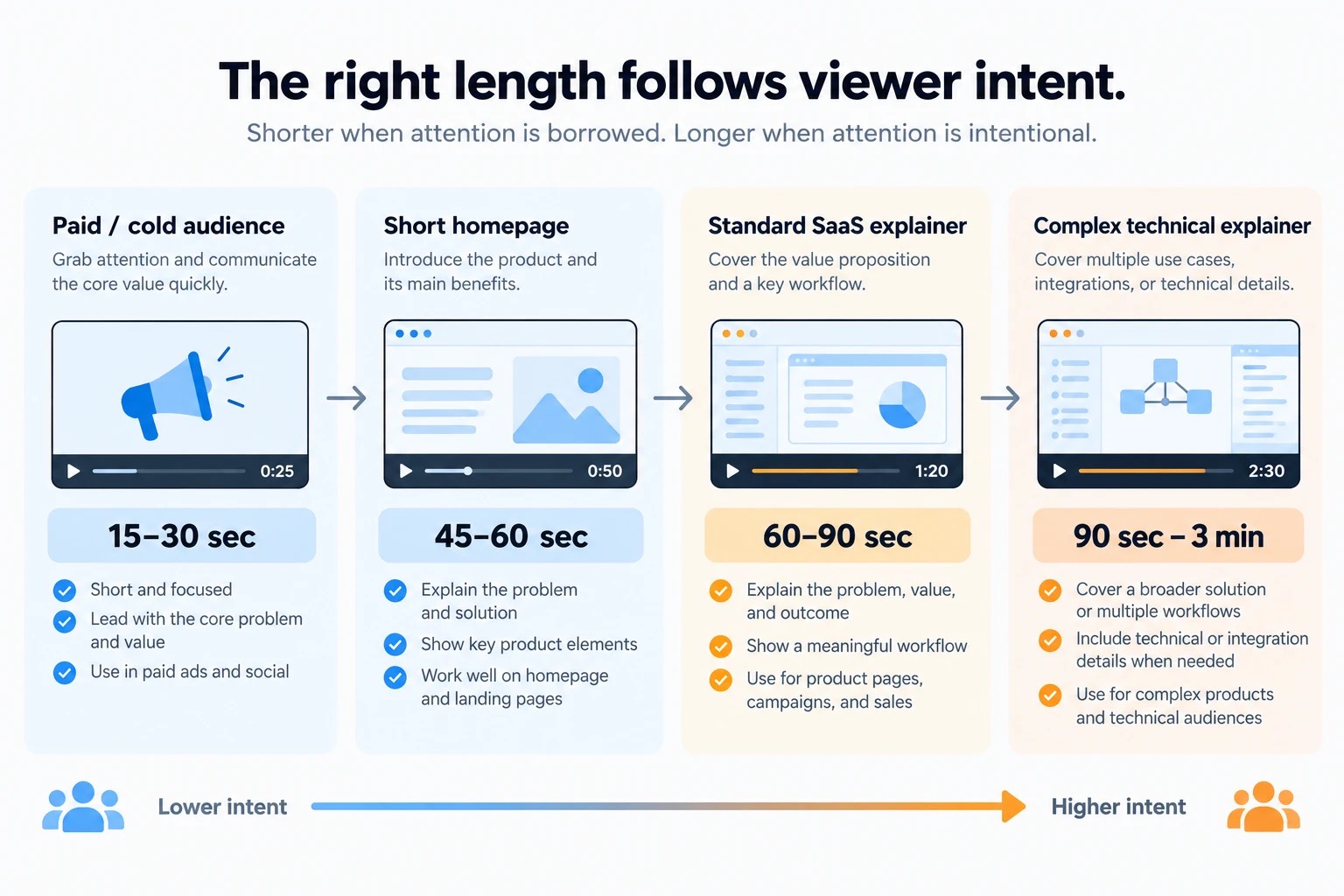
A paid-social version may need to make its point in 15–30 seconds. A simple homepage story may work in 45–60 seconds. A technical SaaS product may genuinely need two or three minutes.
The right question is not:
“What is the ideal explainer video length?”
It is:
“How much does this viewer need to understand before taking the next step?”
That answer determines the runtime.
On this page
SaaS explainer video length at a glance
| Use case | Useful planning range | What the video needs to do |
|---|---|---|
| Paid social / campaign cutdown | 15–30 sec | Earn attention and communicate one idea |
| Short homepage explainer | 45–60 sec | Establish problem, product, and value quickly |
| Standard SaaS explainer | 60–90 sec | Explain the core proposition and show enough product proof |
| Complex / technical explainer | 90 sec–3 min | Explain something that genuinely requires more context |
| Detailed product demo | 2–5+ min | Show a workflow in depth — usually no longer an explainer |
These are planning ranges rather than platform limits.
Alconost Video currently describes 60–90 seconds as the usual range for custom explainer videos and notes that technical content can extend to two or three minutes when the script remains focused.
The key is to avoid making the video longer simply because there is more you could say.
Why 60–90 seconds works so well for SaaS
A SaaS explainer has a relatively small job.
It normally needs to communicate four things:
There is a problem.
Your product addresses it.
Here is roughly how.
Here is why the viewer should care.
That is fundamentally different from teaching someone how to use the software.
In 60–90 seconds, you have enough room for a simple narrative without asking a first-time viewer to commit several minutes before they even know whether the product is relevant.
This range also forces prioritization.
If your team knows the product extremely well, almost every feature feels important:
- integrations;
- automation;
- analytics;
- permissions;
- AI;
- dashboards;
- reporting;
- security;
- workflows.
But a first-time viewer does not need the product roadmap.
They need a mental model.
A good explainer helps them answer:
“I get it. This is for me, and this is why it is useful.”
Everything else can come later.
Length should follow placement
The same product may need several different runtimes because the audience encounters the video in different contexts.
A person who clicks play on your homepage has made a small intentional commitment.
Someone who sees the same creative while scrolling LinkedIn has not.
A prospect who opens a video sent after a sales call may actively want detail.
Same product ≠ same runtime everywhere
Those are three different attention environments.
So determine placement before locking the script.
Homepage explainer: usually 60–90 seconds
For a SaaS homepage, 60–90 seconds remains a strong default.
The viewer has probably arrived because:
- they searched for a solution;
- they followed a recommendation;
- they clicked an ad;
- they saw your company mentioned somewhere;
- they are comparing products.
They are interested, but they have not committed much yet.
The video should therefore get to the proposition quickly.
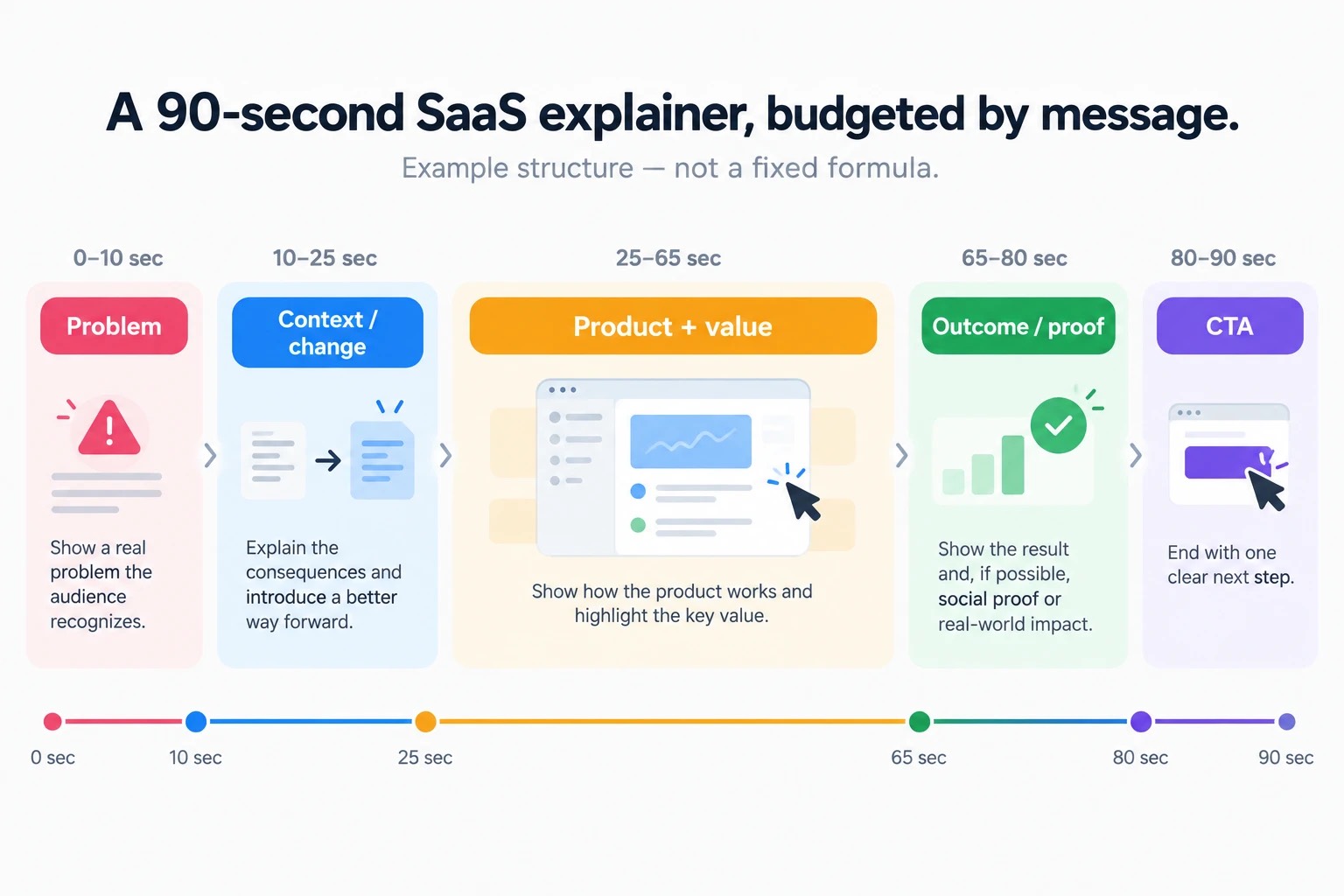
A useful 90-second structure might look like this:
0–10 sec: The problem
Show a situation the buyer immediately recognizes.
10–25 sec: The change
Introduce the product and explain what becomes different.
25–65 sec: Product + value
Show selected UI moments or visual examples that make the promise believable.
65–80 sec: Outcome
Return to what the user gets from the product.
80–90 sec: CTA
Give them one next step.
This is not a formula that every script has to follow second by second.
It is a useful constraint.
If you reach second 70 and still have not shown what the product actually does, the script probably spent too long setting up the problem.
Can a SaaS explainer be 30 seconds?
Yes.
But a 30-second explainer needs a very simple job.
You may have time for:
Problem → Product → Benefit → CTA
and very little else.
Thirty seconds works particularly well when:
- the product category is already familiar;
- the value proposition is easy to understand;
- the viewer only needs one message;
- the video is being used as a campaign asset;
- you are creating a shorter cut from a longer master explainer.
For example:
Teams lose hours manually turning customer calls into CRM updates.
Then show the product doing it automatically.
Then show the benefit.
Then CTA.
That can work in 30 seconds because the problem does not require explanation.
But if you also need to explain why the problem exists, introduce a new category, show three workflows, and differentiate the product from competitors, 30 seconds will probably create a rushed video.
Shorter is useful only when the message itself is simple enough.
When 45–60 seconds is enough
Sixty seconds is a particularly useful target when the SaaS product has one clear promise.
One clear promise = less runtime needed.
Imagine:
- an AI meeting-notes tool;
- a scheduling application;
- a focused analytics product;
- a simple developer utility.
The viewer understands the category almost immediately.
A strong 60-second video can spend:
- a few seconds on the problem;
- a few seconds introducing the product;
- most of its time showing the transformation;
- a few seconds on the CTA.
There is no benefit in stretching that story to 90 seconds because “explainer videos are supposed to be 90 seconds.”
Length is not a quality signal.
A 58-second video that completely explains the idea is finished.
When 90 seconds is better than 60
Some SaaS products need a little more context before the value becomes obvious.
For example:
- a platform serves several teams;
- the product replaces an established workflow;
- there is an important before-and-after process;
- the value depends on combining several pieces of information;
- the product category itself needs explanation.
Trying to compress that into exactly 60 seconds can cause a different problem:
everything becomes too fast.
Too compressed
- fast VO
- flashing UI
- no time to process
Enough room
- readable UI
- pauses
- clearer narrative
Voice-over speeds up.
UI scenes flash past.
Important ideas get half a second on screen.
The viewer technically receives more information but understands less of it.
An additional 20 or 30 seconds can make the video feel shorter because the information becomes easier to process.
Do not optimize runtime by making the narrator talk faster.
Optimize it by deciding what belongs in the video.
Can a SaaS explainer be two minutes long?
Yes.
Two minutes is not automatically too long.
The important distinction is why it is two minutes.
Good reason:
The product solves a genuinely complex technical problem and needs additional context before a reasonable buyer can understand its value.
Bad reason:
Six internal stakeholders each insisted on adding another feature.
A technical explainer about cybersecurity, infrastructure, developer tooling, data systems, healthcare software, or a specialized B2B platform may need additional time.
That is fine if the script remains focused.
Complexity can justify length.
Feature accumulation cannot.
When does an explainer become a demo?
This is where many SaaS teams accidentally create a three-minute “explainer.”
The first minute explains the proposition.
Then the video continues:
“Now let us show you the dashboard.”
Then: “Here is reporting.”
Then: “Here are integrations.”
Then: “Here is the administration panel.”
At that point, the issue is no longer video length.
The video has changed jobs.
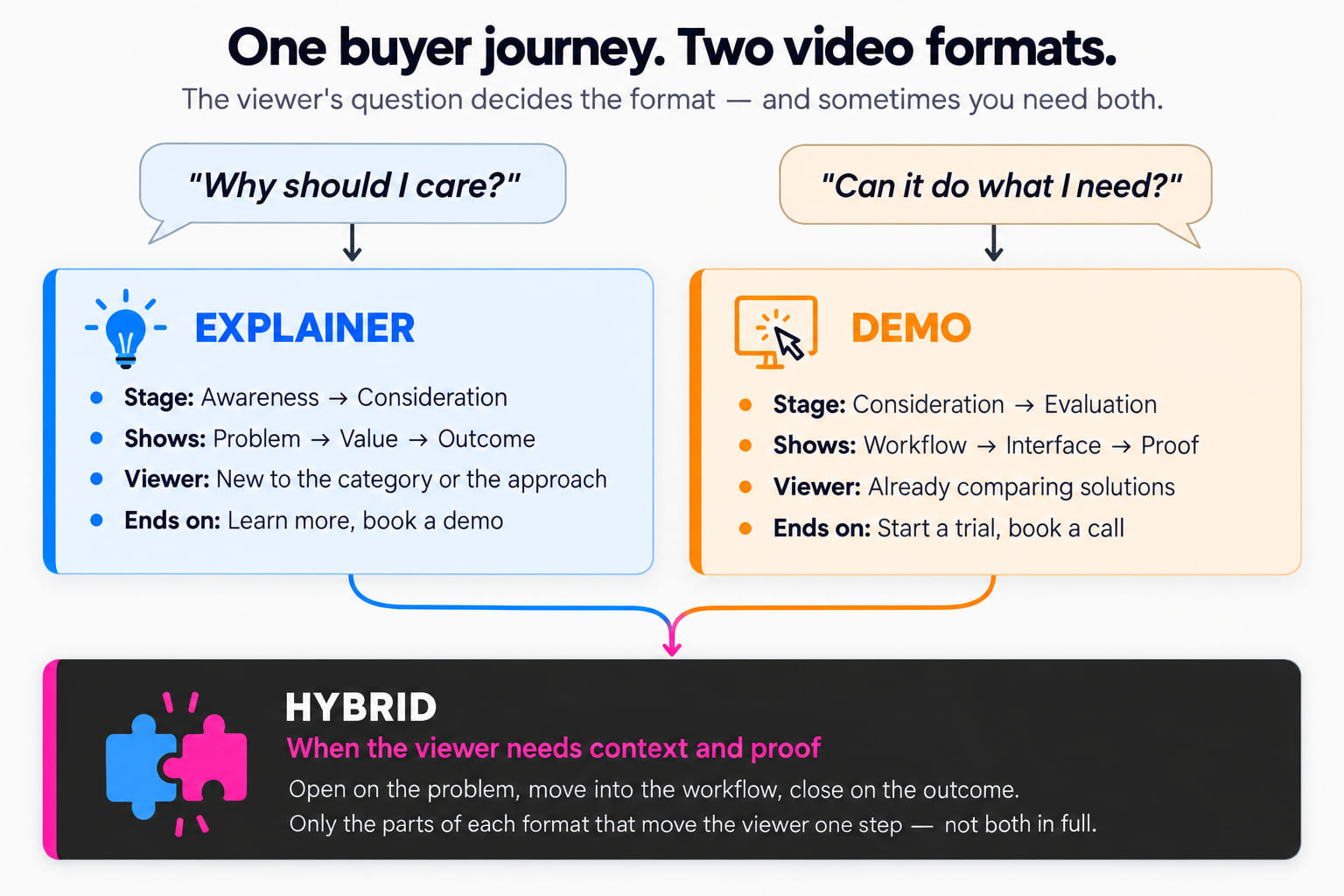
An explainer answers:
Why does this product matter?
A demo answers:
How does this product work?
If you need several minutes to demonstrate a workflow, that may be perfectly reasonable — but call it a demo and design it for a viewer who wants deeper product proof.
Your script sets the runtime
Video length problems usually start as script problems.
If the script contains 400 words, you do not have a 90-second video.
You have either:
- a longer video;
- or an exhausted voice actor.
Professional English narration commonly runs around 140–160 words per minute, with roughly 150 words per minute being a useful planning figure.
That puts a 60-second script around 140–150 spoken words and a 90-second script around 200–225 words before allowing for meaningful pauses and visual breathing room.
Planning range — pauses, UI animation and technical language may require fewer words.
Do not treat that number as a word quota.
A video with sophisticated UI animation may need more silence.
A technical sentence may need more time on screen.
A character-driven animation may need a pause for a reaction.
The visuals are part of the explanation.
If the narration fills every second, the animation becomes subtitles with moving pictures.
A useful script budget for a 60-second explainer
If you are aiming for roughly one minute, the script does not have room for five messages.
One possible budget is:
10 seconds — problem
Make the viewer recognize themselves.
10 seconds — product
Explain what changes.
30 seconds — value and proof
Show the core workflow, selected product UI, or the mechanism that supports the claim.
10 seconds — outcome and CTA
Close the loop.
Notice what is missing:
- the company history;
- every feature;
- every integration;
- three different buyer personas;
- a long logo intro.
A sixty-second video cannot do everything.
That is precisely why it can work.
A useful script budget for a 90-second explainer
Ninety seconds gives you enough room for one extra layer of reasoning.
For example:
0–10 sec — recognizable problem
10–25 sec — why existing approaches are frustrating
25–40 sec — introduce the product
40–70 sec — show two or three connected value moments
70–82 sec — outcome or proof
82–90 sec — CTA
This works well when the product needs context before the interface becomes meaningful.
Again, it is a planning framework rather than a mandatory template.
Do not use runtime to solve a messaging problem
Sometimes a team says:
“We cannot explain the product in 90 seconds.”
That may be true.
But before extending the runtime, ask why.
Often the real problem is that the video is trying to address:
- three audiences;
- five use cases;
- eight features;
- two products;
- and an entire company positioning story.
No runtime solves that cleanly.
A four-minute video will simply contain four minutes of competing messages.
Choose a primary audience and one main proposition first.
Then see how much time the story actually needs.
One explainer does not need to explain the entire SaaS
This is particularly important for complex platforms.
Suppose your SaaS serves:
- marketing;
- sales;
- customer success;
- operations.
There may not be one perfect video that explains the product equally well to everyone.
You might be better off with:
- a 75-second master explainer;
- a 60-second sales use-case video;
- a 60-second marketing use-case video;
- a two-minute technical demo;
- several short feature clips.
That is not content duplication.
Each video answers a different question.
Trying to make the homepage explainer cover the entire content library is what creates five-minute homepage videos.
Where should the most important message appear?
Early.
Do not build a video like a mystery novel.
For SaaS, the viewer should understand the basic proposition before the video is halfway over.
Do not spend:
- 15 seconds on a logo;
- 20 seconds describing how rapidly the industry is changing;
- 15 seconds saying companies face challenges;
- and finally introduce the product at second 50.
Start closer to the problem.
Should you mention every feature?
No.
An explainer is not product documentation.
Choose features only when they help explain the value proposition.
For example:
If the promise is:
“Turn customer feedback into prioritized product decisions.”
then showing:
- feedback collection;
- automatic clustering;
- prioritization;
may support the story.
Showing:
- user permissions;
- export settings;
- custom themes;
- billing controls;
probably does not.
Those features can be useful.
They just belong somewhere else.
The shorter the video, the more disciplined this decision needs to be.
Does a longer video hurt conversion?
Not automatically.
A viewer does not abandon a video because a timer reaches 91 seconds.
They leave because continuing no longer feels worth their attention.
That means a relevant two-minute video can outperform an irrelevant 45-second one.
The relationship between length and engagement is real, but it is mediated by intent.
Someone watching a social ad has low commitment.
Someone researching enterprise software may deliberately watch a detailed product video.
This is why average retention benchmarks should guide planning rather than dictate the edit.
Judge the finished video by what you need it to accomplish:
- Did viewers reach the key message?
- Did they click the CTA?
- Did they continue to a product page?
- Did qualified prospects use the video?
- Did it help sales explain the product?
Completion rate is useful.
It is not the business objective.
What if your first cut is too long?
Do not immediately speed up the voice-over.
Cut information in this order.
Remove repeated claims
SaaS scripts often say the same benefit twice:
- first as abstract marketing language;
- then again while showing the UI.
Keep the stronger version.
Remove secondary features
If a feature does not change the main story, it probably belongs in another video.
Shorten the setup
The audience likely does not need 25 seconds to understand that manual workflows are frustrating.
Let visuals carry information
If the screen clearly shows a report being generated automatically, the narrator does not always need to say:
“The report is generated automatically.”
Use narration and visuals to complement each other rather than duplicate each other.
Split the video
If both halves are useful but serve different questions, you may have two videos.
That is often a better solution than aggressive editing.
What if your video is too short?
This happens too.
A team decides beforehand that the video must be 30 seconds.
The result races through the product so quickly that nobody understands it.
If the viewer needs another 15 seconds to process the story, use them.
Add time when it provides:
Do not add time simply because the video “feels short.”
What about localization?
If the SaaS explainer will be localized, avoid planning the English master so tightly that there is no timing flexibility.
Translated narration does not always take exactly the same amount of time.
A sentence that fits comfortably in English may become longer in another language.
The animation therefore benefits from:
- flexible holds;
- modular scenes;
- editable on-screen text;
- room around key transitions.
A master explainer built with zero timing margin can become unnecessarily expensive to localize.
This is especially relevant for companies planning one video for many markets.
How long should your SaaS explainer video be?
Use 60–90 seconds as the default.
Then adjust based on three things.
Viewer intent
Cold viewer → shorter.
Actively researching buyer → more room.
Placement
Paid campaign → shorter.
Homepage → approximately 60–90 seconds.
Technical/product page → potentially longer.
Message complexity
One familiar proposition → 45–60 seconds may be enough.
A more complex SaaS → 90 seconds or longer may be justified.
If the video needs several minutes because you are demonstrating a workflow in detail, consider whether you are actually making a demo rather than an explainer.
That distinction is more useful than arguing over 60 versus 90 seconds.
Frequently asked questions
What is the ideal length for a SaaS explainer video?
For most SaaS explainers, 60–90 seconds is a useful default. It provides enough time to establish the problem, introduce the product, communicate the main value, and close with a CTA.
Is 60 seconds long enough for an explainer video?
Yes, when the product and value proposition are relatively easy to understand. A focused 60-second explainer can work particularly well on a homepage or landing page.
Is a two-minute explainer video too long?
Not necessarily. Complex or technical SaaS products may require additional context. A two-minute video is reasonable when every section contributes to understanding the core proposition.
Can an explainer video be 30 seconds?
Yes, especially for campaign use, simple products, or audiences that already understand the category. Thirty seconds usually requires limiting the video to one message.
How many words should a 60-second explainer script have?
At a natural professional narration pace, roughly 140–150 spoken words is a useful planning range. Leave room for pauses and visuals rather than treating the number as a target.
How many words should a 90-second explainer script have?
Roughly 200–225 spoken words is a practical starting range at a conversational pace, though technical language and visual pauses may require fewer.
Should a SaaS explainer be shorter than a product demo?
Usually, yes. Explainers tend to introduce the proposition and are often 60–90 seconds, while demos can run longer because viewers have more intent and need to see a workflow in detail.
Does a shorter explainer video always perform better?
No. Shorter videos reduce the commitment required from viewers, but clarity and relevance matter more than hitting an arbitrary runtime. A video should be as short as possible without making the story rushed or incomplete.
Make the video as short as the idea allows
There is no reward for producing a 60-second explainer if the viewer finishes it confused.
And there is no reward for producing a three-minute video because every internal stakeholder managed to keep their favorite feature in the script.
A good SaaS explainer is long enough to create understanding and short enough to avoid asking for attention it has not earned.
For many products, that means 60–90 seconds.
For some, it means 45.
For a genuinely technical story, it might mean two minutes.
Start with the viewer, the placement, and the one thing the video needs to explain.
Then let the runtime follow.
Alconost Video produces custom SaaS and software explainer videos from script and storyboard through animation, voice-over, sound design, and multilingual localization.
If you need a video that explains a complex SaaS product without turning it into a feature tour, explore our SaaS explainer video production service.
60–90 sec is often enough when the message is focused.
Explore SaaS explainer video productionRelated articles
SaaS Demo Video vs Explainer Video: Which One Do You Need?
Video Production
18 minutes read

How to Create an Engaging and Easy-to-Watch Explainer Video
Video Production
10 minutes read
Popular articles
Voiceovers in 14 languages for the Kerish Doctor software
Success stories
Voice Over
5 minutes read
Character voiceovers in Spanish and Brazilian Portuguese for the RPG Life is Feudal: Your Own
Success stories
Voice Over
5 minutes read
How Much Does an Animated Explainer Video Cost? Explore the figures!
Video Production
4 minutes read
Latest articles
SaaS Demo Video vs Explainer Video: Which One Do You Need?
Video Production
18 minutes read
How to Localize Playable Ads for Multiple Markets
Playable Ads
16 minutes read
How Much Does a Playable Ad Cost to Produce?
Playable Ads
13 minutes read
Have a project in mind?
We’d like to learn more about it. In return, we’ll get back to you with a solution and a quote.
Looking for a new job? Apply here!